
Eonevolve Learning

Eonevolve News Brief

Unity 7 announced: what changes, what is planned, and what to do now

Unity has announced Unity 7 for early 2027, with an early beta planned for December 2026. The roadmap emphasizes faster iteration, a new CLI and public API, coding-agent connectivity through MCP, graphics changes, and continuity from Unity 6. Here is what Unity has actually confirmed, what remains a roadmap promise, and how a team can prepare without betting production on an unreleased editor.

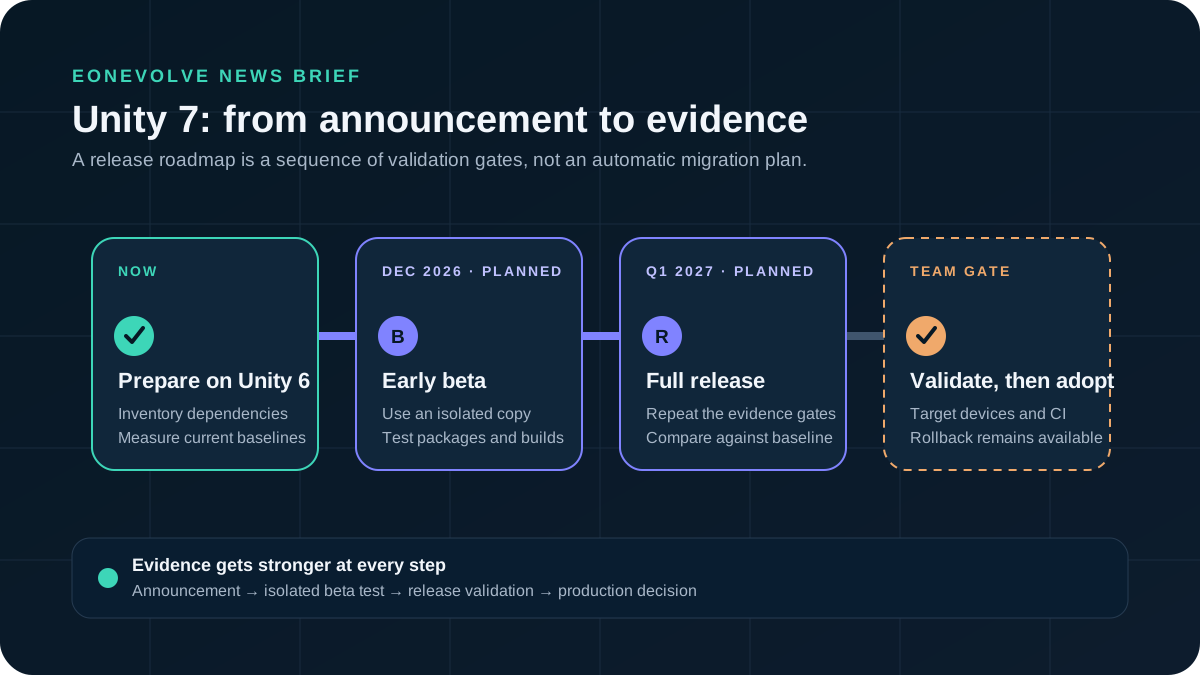
A timeline from current Unity 6 preparation through the planned December 2026 Unity 7 beta and planned early 2027 release, followed by project validation.
Eonevolve's reading of the announced Unity 7 timeline: prepare on current Unity 6, test the beta away from production, then adopt only after project-level validation.

The 60-second answer

Unity 7 is real, but most of its headline capabilities are still forward-looking. Treat the announcement as a roadmap and preparation signal, not as a production upgrade instruction.

Unity 7 at a glance

Announcement
July 21, 2026Confirmed

Unity announced plans for Unity 7 at Unite Seoul.

Early beta
December 2026Roadmap

This is the current testing window stated in Unity's announcement, not a guaranteed shipping date.

Full release
Q1 / early 2027Roadmap

Unity's release page says early 2027 and the roadmap announcement says Q1 2027.

Continuity
Built on Unity 6.x foundationsVendor claim

Unity says Unity 6 projects, skills, and code will carry forward without a traditional rebuild. Real project compatibility still needs beta and package-level validation.

Prepare now
Use a current Unity 6 releaseConfirmed

Unity recommends moving toward the latest Unity 6 release to experience foundations being delivered before Unity 7.

Confirmed, roadmap, vendor claim, or unknown?

The announcement mixes present facts with planned capabilities. Keeping those states visible prevents a roadmap sentence from turning into an engineering assumption.

Evidence status

RoadmapRoadmap

CoreCLR, near-instant Play Mode, selective domain reloads, and faster shader builds

These are announced Unity 7 directions. The press release includes a claim of shader builds up to 90% faster, but there is not yet a public production release to validate the result across projects.

RoadmapRoadmap

A new CLI, public API, and free-to-use MCP connection

Unity says these surfaces will let people and coding agents validate assets, push builds, and work with Unity from their own tools.

UnknownUnknown

Final package compatibility and production adoption cost

The announcement does not provide a complete compatibility matrix for every package, plug-in, custom Editor tool, build target, or device profile.

UnknownUnknown

Final LTS and support details

The cited announcement pages do not yet establish a complete LTS calendar or a project-specific migration guarantee.

A useful release timeline

The safest interpretation is a sequence of evidence gates. Each later step needs stronger project-level proof than the step before it.

From announcement to adoption

  1. · Announced

    Confirmed

    Unity 7 roadmap becomes public

    The direction and release window are public. Teams can inventory dependencies and measure current iteration costs without changing their production baseline.

  2. Prepare

    Confirmed

    Move toward a suitable current Unity 6 release

    Unity positions current Unity 6.x work as the foundation for Unity 7. Upgrade Unity 6 only through your normal compatibility and release process.

  3. Planned beta window

    Roadmap

    Test a disposable project or isolated copy

    December is a planned early-beta window. Use it to test import, compilation, Play Mode, packages, builds, and target devices away from the production branch.

  4. Team decision

    Unknown

    Adopt only after project validation

    Package compatibility, CI, build output, device performance, and rollback confidence decide the production date. This is Eonevolve editorial guidance, not a Unity release promise.

What Unity says will change

The announcement groups Unity 7 around five pillars. Four affect daily development or shipping directly; the fifth is the promised continuity layer underneath them.

Five announced directions

What a Unity team should do now

Preparation should make the future test cheaper without making today's project depend on an unreleased editor.

Low-regret preparation checklist

  • Keep production on an intentionally chosen Unity version

    Do not redesign a shipping plan around Unity 7 yet. Upgrade current Unity 6 versions only when your compatibility and release evidence supports it.

  • Inventory packages and Editor extensions

    Record package versions, native plug-ins, custom inspectors, build scripts, and platform SDK dependencies. This becomes the beta test matrix.

  • Measure today's iteration baseline

    Capture representative compile, domain reload, Play Mode, shader build, and player build times. Without a baseline, faster remains a feeling rather than evidence.

  • Make validation callable

    Expose repeatable tests, asset checks, and build verification through narrow scripts or commands. That work helps today and prepares for future CLI and agent workflows.

  • Create an isolated upgrade rehearsal

    When the beta is available, test a copy or disposable branch. Keep production assets, credentials, and deployment actions outside the experiment.

  • Define an adoption gate before testing

    Agree on package compatibility, test pass rate, build parity, target-device performance, team workflow, and rollback requirements before enthusiasm changes the threshold.

Why the MCP announcement matters for game development

A game project is more than code files. Scene hierarchy, components, assets, build settings, console state, and Editor state all influence the answer to a development question.

From code-aware to project-aware assistance

Unity describes an MCP server as a bridge that lets compatible AI tools access project context such as scene hierarchy, code, and Editor state. Its current Unity AI material also describes an official MCP server in the Unity AI Assistant package.

That does not make an agent automatically correct or safe. Useful integration still depends on narrow tools, bounded context, explicit write permissions, human approval points, deterministic tests, and a reviewable evidence trail.

Continue into the learning graph

These existing lessons build the engineering habits that make future Unity 7 and MCP experiments safer and easier to evaluate.

Related Eonevolve learning

Official sources

The brief uses Unity's own release, newsroom, and product material. Product plans can change, so open the source next to any decision that depends on timing or availability.

Primary references

Update log

Meaningful corrections and roadmap changes are recorded here. The original publication date remains stable.

Article history

  1. Recorded the now-available MCP for Game Development Advanced path, completing the published Beginner, Intermediate, and Advanced series.

  2. Recorded the now-available MCP for Game Development Intermediate path while keeping Advanced explicitly planned.

  3. Linked the now-available MCP for Game Development Beginner path while keeping Intermediate and Advanced explicitly planned.

  4. Initial publication based on Unity's release page, Unite Seoul roadmap announcement, MCP explainer, and Unity AI beta page.